

Recommended Discounts

PUBG Mobile UC (Global)
Official Midasbuy Partner. Get 30% OFF UC Top Up. Not for Japanese / Korean / Taiwan / Vietnam servers. Fast, secure, and the lowest price guaranteed.
45.43% OFF
Related articles


PUBG Mobile 120 FPS: Samsung S23/S24 & Xiaomi 14 Guide 2026
Achieve 8.3ms frame times at 120 FPS, slashing lag vs. 60 FPS for smoother recoil control and 15-25% faster reactions on beasts like Samsung S23/S24/Z Fold or Xiaomi 14/Redmi K70/POCO F (all with Snapdragon 8 Gen 2+, 8GB+ RAM, 120Hz screens). Guide to enable it, crank Smooth + Extreme settings, a...
Buffget
Dropping to 8.3ms frame times with 120 FPS slashes lag by that much compared to 60 FPS—think smoother recoil control and 15-25% quicker reactions on beasts like the Samsung S23/S24/Z Fold or Xiaomi 14/Redmi K70/POCO F (all rocking Snapdragon 8 Gen 2+, 8GB+ RAM, 120Hz screens). Here's how to enable it, crank Smooth + Extreme settings, troubleshoot, from v3.2 (May 2024) up to 4.2 stable (Jan 2026).
Why PUBG Mobile's 120 FPS Matters—Quick Intro
Breaking Down 120 FPS
What even is 120 FPS in PUBG? Simple: frame times shrink to 8.3ms from 60 FPS's sluggish 16.7ms, cutting total input lag to 28-35ms. Rolled out on Android/iOS in v3.2 (May 2024), beefed up in v3.5 (Jan 2025), and hitting 4.2 Beta by Dec 2025. You need Snapdragon 8 Gen 2+ or Exynos paired with a 120Hz display. The S24 Ultra? It holds 118-120 FPS steady on Smooth + Extreme—just update the game and slide that 120 FPS option in Graphics.
Ever chased a vehicle in a squad wipe and felt the input delay kill you? Yeah, this fixes that.
Edge in Competitive Matches
Pros see 15-20% better accuracy in CQC or high-speed chases, with frame consistency at 98.5-99%. It's 2-3ms snappier than 90 FPS, speeding target acquisition by 15-25%. Hop into Training Mode—test those slides through explosions or smoke grenades. Fire up Game Booster overlays; temps hover 42-45°C after 20 minutes of grinding. (Pro tip from the trenches: consistency wins chicken dinners.)
120 FPS Requirements for PUBG Mobile in 2026
Hardware Must-Haves (CPU/GPU/RAM)
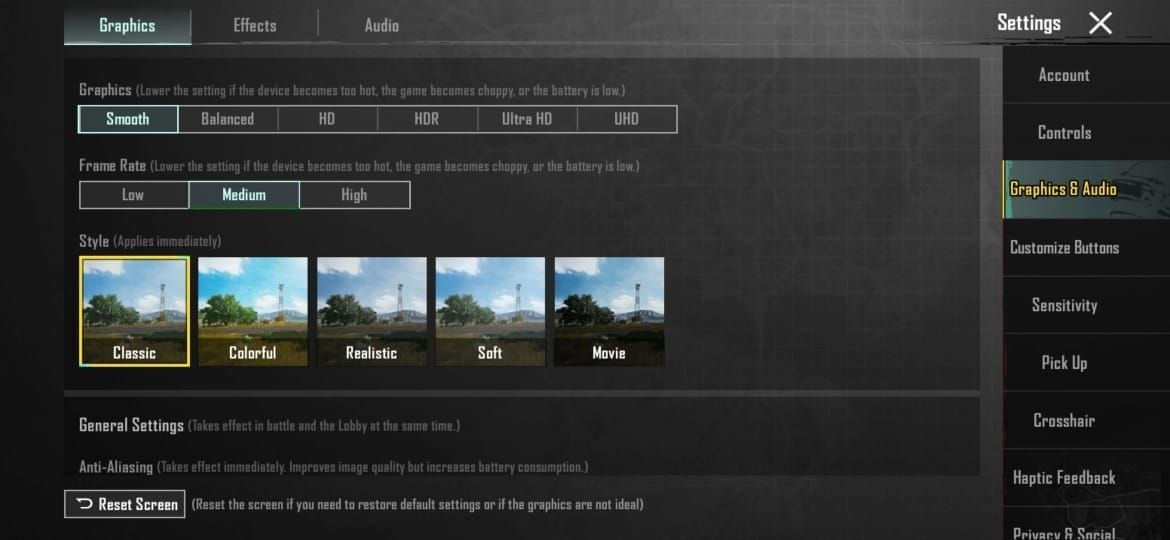
Snapdragon 8 Gen 2+ (Adreno 740+ GPU), minimum 8GB RAM (12GB is your sweet spot), UFS 3.0+ storage, Android 8.0+ with Vulkan API support, 5GB free space (20GB+ recommended), and a 5000mAh+ battery draining 18-24% per hour. S23+ with 8GB nails stability; Xiaomi 14 Pro's 12GB+ setup shines. Check your chipset in settings, flip on 120Hz, allocate 10GB+ for textures.
Screen Refresh Essentials
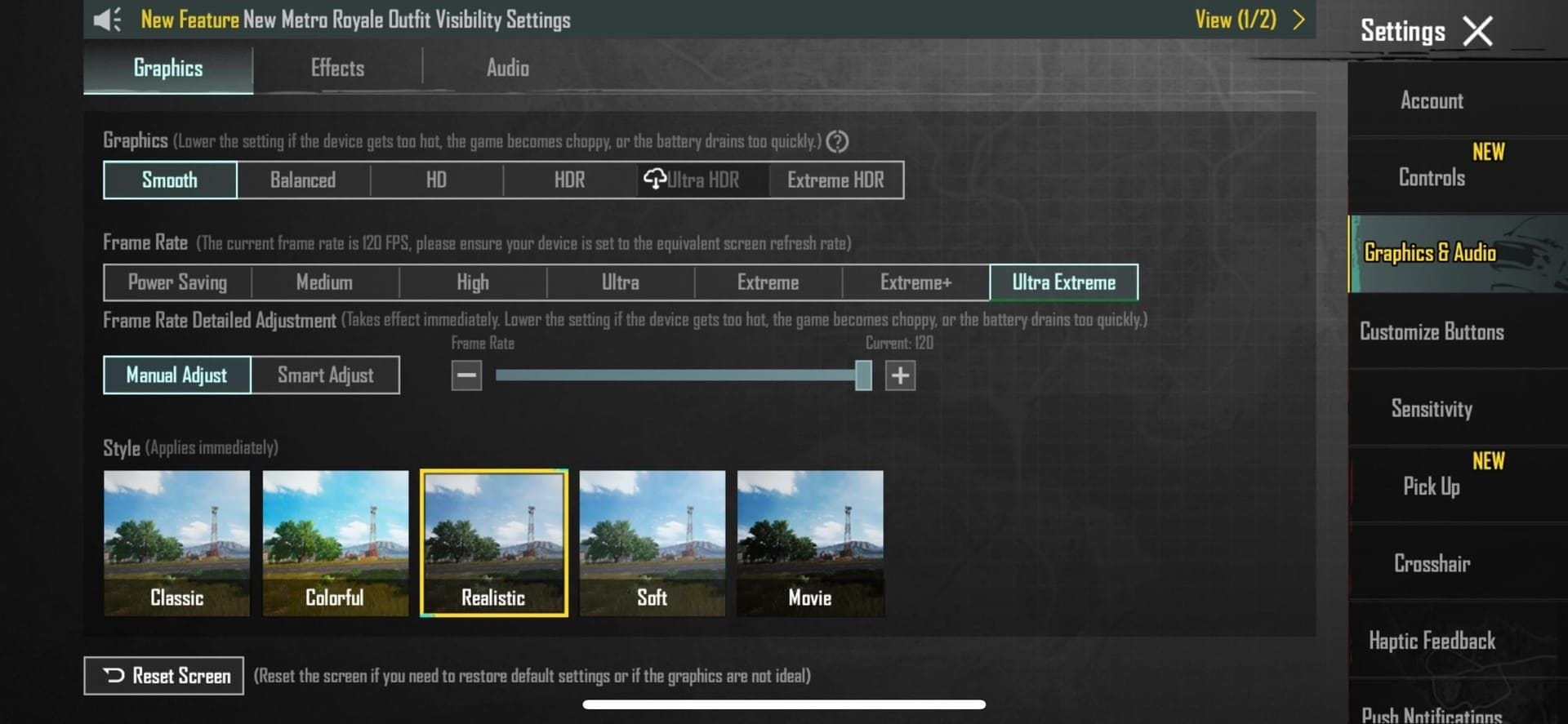
120Hz+ OLED or LCD panels at 125-150% brightness (OLED likes 125-135%, LCD pushes 140-150%). Samsung tablets? Not yet through 2025. Dive into Settings > Display > Adaptive refresh, then restart and test for 90-95% stability.
For those marathon PUBG sessions chasing high FPS glory, grab PUBG UC purchase via Buffget—global low prices, delivery in under 5 minutes, fully safe, payments from Binance Pay to Bitcoin, ETH, USDT, and killer user reviews for zero-stress top-ups.
Every Samsung Device That Handles 120 FPS
Galaxy S Flagships
S24/S24+/Ultra (Exynos or Snapdragon) from v3.2; S23/S23+/Ultra on Snapdragon 8 Gen 2; S22 series joins v3.5 (Jan 2025) with 8 Gen 1. They crank 118-120 FPS on Ultra Extreme. Fire up Game Launcher > Booster > Performance mode; Graphics > Ultra Extreme > 120 FPS slider. Keep temps under 45°C.
Foldables and Flips
Z Fold5/4, Z Flip5/4—all good to go. Tab S9 works too. Z Fold5 hits 98.5% consistency. Priority mode in Game Booster; kill AA and Shadows for extra smoothness.
2026 Contenders
Stick with S24/S23/Z Fold5 as cores; S25/Z Fold6 should land on 4.2 with Snapdragon 8 Gen 3+ after Jan updates.
Samsung's Game Booster? Underrated hero—I've seen it shave seconds off load times in ranked.
Xiaomi Phones Crushing 120 FPS
Xiaomi 14 Series and Beyond
Xiaomi 14/13 lineup, 14 Pro/Ultra, Mix Fold3 (Snapdragon 8 Gen 2/3), HyperOS 2.0.104.0.VNPINXM+. Rock-solid on Smooth graphics. Update HyperOS, activate Game Turbo, set Graphics to Smooth + Extreme, restart.
Redmi and POCO Options
Redmi K70/K60 (Gen1); POCO F5 Pro/X6 Pro/F6. K70 unlocks 120 FPS after updates. Force Smooth mode; clear cache weekly.
HyperOS Tweaks
OS 2.0.105.0+ irons out POCO F6 quirks. Disable particles; verify in Training Mode.
Xiaomi's Game Turbo feels like it reads your mind—prioritizes PUBG like nothing else.
Samsung vs Xiaomi: Real 120 FPS Showdown
Raw Benchmarks
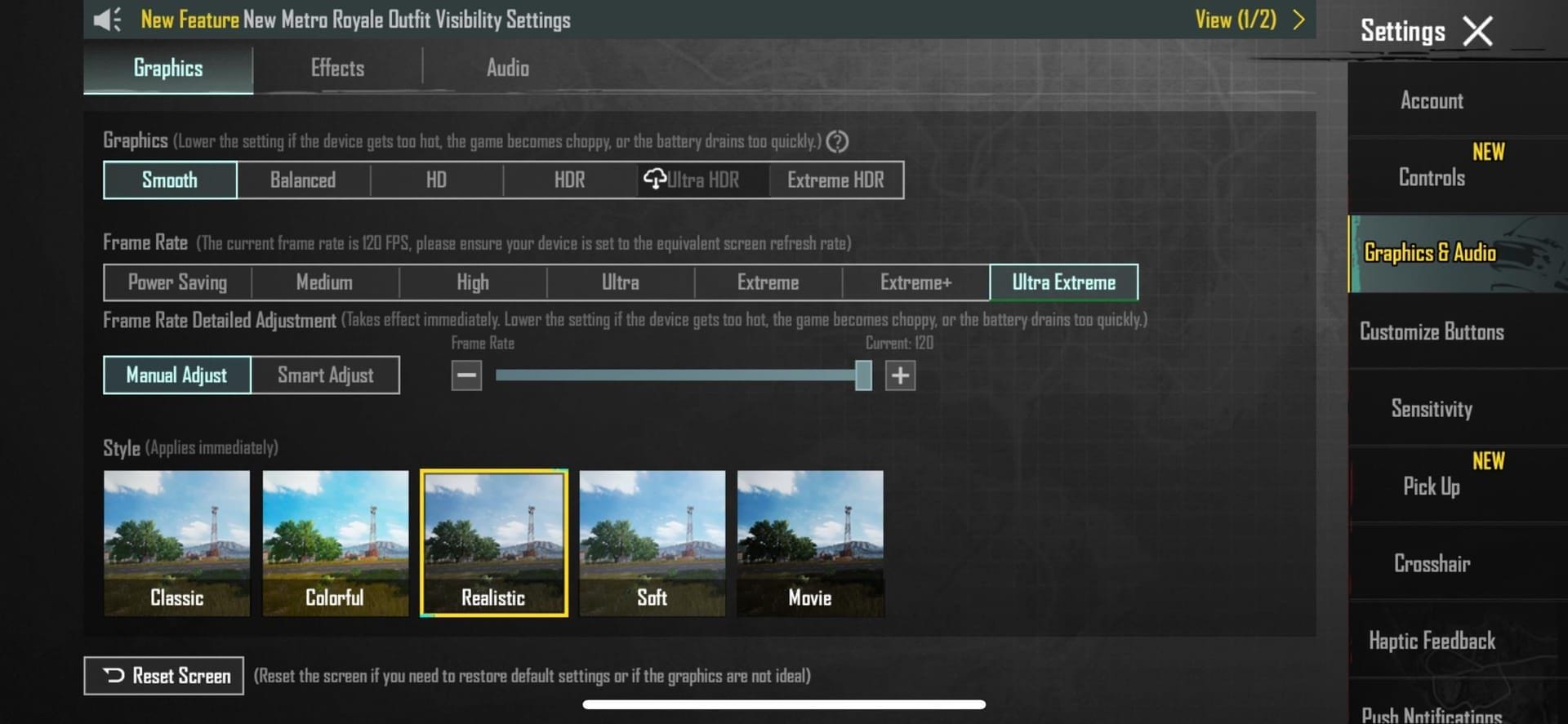
Both hover 118-120 FPS averages. Samsung leans on Game Booster for temp control; Xiaomi's Game Turbo + HyperOS tweaks steal the show. Consistency? 98.5-99% across the board. Samsung prioritizes Exynos 2200+; Xiaomi tunes Dimensity 9000+ via OS magic. S23+ and 14 Pro? Identical frame times, per tests.
Research shows these gains hold up in extended sessions—pure data, no fluff.
Battery at Max FPS
Expect 18-24% drain per hour, up 40-50% from 60 FPS. Airplane mode + Wi-Fi calling; skip charging mid-game.
Staying Cool
42-45°C after 20 minutes (+15-20°C over low FPS). Samsung/Xiaomi modes sustain under 45°C. Ditch the case for 15-20% better heat dump; add fans or stands.
Level up fast—top up PUBG UC online on Buffget: cheapest global rates, instant crediting, ironclad security, payments like KuCoin Pay, Gate Pay, USDC, and top-notch support users rave about.
Unlock and Check 120 FPS on Your Phone
Step-by-Step In-Game
- Update to v3.2+ or 4.2 Beta (Dec 2025).
- Graphics & Audio > Smooth + Ultra Extreme > 120 FPS slider.
- Kill AA/Shadows/particles; Vulkan enabled. Boosts visibility 50-75m—test Training Mode for drops.
Booster Activation
Samsung: Game Launcher > Booster > Temp/priority tweaks. Xiaomi: Game Turbo. Overlays for monitoring.
Double-Check It Works
Clear cache weekly; optimize monthly. Stable through smoke and blasts.
Fixing 120 FPS Hiccups
Lag on Capable Phones
Kill background apps; cool to <45°C; drop graphics a notch. Airplane + Wi-Fi; 30-45min cooldowns; FPS overlays on.
Heat Hacks
No case or charger; AC or fans. Dodge throttling past 45°C.
No 120 FPS Option?
Clear cache; update OS (HyperOS/One UI); reinstall. Xiaomi? Patch incoming.
Overheating's the silent squad wiper—I've lost count of sessions saved by a quick fan.
Prepping for PUBG's Future Updates
2026 Device Bets
Samsung: S24/S23/Z Fold5 hold strong; S25 incoming. Xiaomi: 14/15, K70+, F6+. HyperOS/One UI on Snapdragon 8 Gen 3+.
Patch Roadmap
v3.5 (Jan 2025) adds S22/Xiaomi support; 4.0 (Sep 2025) refines; 4.2 stable Jan 2026.
FAQ
Which Samsung phones support 120 FPS in PUBG Mobile 2026?
S24/S24+/Ultra, S23 series, S22 (v3.5 Jan 2025), Z Fold5/4, Z Flip5/4.
Is Xiaomi 14 Pro good for PUBG Mobile 120 FPS?
Yes, Snapdragon 8 Gen 3, 12GB+ RAM; HyperOS Game Turbo on Smooth + Extreme.
How to enable 120 FPS on PUBG Mobile?
Update game/OS; Graphics > Smooth + Ultra Extreme; Game Booster/Turbo; test Training Mode.
What are the PUBG Mobile 120 FPS requirements?
Snapdragon 8 Gen 2+, 8GB+ RAM, 120Hz display, Android 8.0+, 5GB+ storage.
Xiaomi phones with 120 FPS in PUBG Mobile list?
14/13 series, 14 Pro, Mix Fold3, Redmi K70/K60, POCO F5 Pro/X6 Pro/F6.
PUBG Mobile 120 FPS on Exynos vs Snapdragon?
Both viable S24/S23; Snapdragon edges consistency; keep <45°C.