

Recommended Discounts

Bigo Live Diamonds
Top up Bigo Live Diamonds in seconds! Just enter your Bigo Live user ID, select the value of Diamonds you wish to purchase, complete the payment, and the Diamonds will be added immediately to your Bigo Live account.
47.57% OFF
Related articles


Bigo Connector v2.0 Guide: Download 40.5MB & Stream PUBG to 600M Users
BIGO LIVE Connector (v2.0.0.39, 40.5 MB) streams PC games like PUBG, Fortnite, Dota 2 to 600M+ users. Covers QR setup, Game Capture, FPS/CPU monitoring, black screen fixes. (28 words)
Buffget
BIGO LIVE Connector (v2.0.0.39, 40.5 MB) streams PC games like PUBG, Fortnite, Dota 2 to 600M+ users. Covers QR setup, Game Capture, FPS/CPU monitoring, black screen fixes. (28 words)
What is Bigo Connector and Why Use It for Bigo Live PC Gaming?
Ever wonder how streamers pull off buttery-smooth PUBG sessions on Bigo Live without their phone overheating? Enter Bigo Connector—it beams your PC screen or games straight to the platform, handling heavy hitters like WoW, Minecraft, GTA, Fortnite, Dota 2, Hearthstone, and Rules of Survival. Pick Game Capture to snag just your open programs, or go Screen Capture for full pixel-perfect resolution. Then chat with viewers, snag live comments and replies, and rake in those rewards/beans (priced USD 0.29-119.99). Oh, and track FPS/CPU right there. It reaches 150+ countries with a solid 4.1/5 rating (168 votes).
Quick wins to get started:
- Stick to fullscreen PC gaming—no emulators needed.
- Keep an eye on those rewards/beans rolling in.
- Ditch mirroring; this setup crushes low-latency.
(Pro tip from the editing desk: Newbies love this for turning casual grinds into viewer magnets.)
System Requirements for Bigo Connector on PC
You'll need Windows OS, admin rights, at least 20 MB storage, and rock-solid broadband. Oh, and preload the BIGO LIVE mobile app (iOS or Android) for that QR magic. We're talking version 2.0.0.39—a quick 40.5 MB download, Windows-only.
Check these off first:
- Confirm 20+ MB free space and stable internet.
- Install the mobile app ahead of time.
- Fire up Connector as administrator.
Mid-range CPU/GPU handles Fortnite fine; windowed or borderless modes keep things smooth. No beast rig required.
Downloading Bigo Connector: Official Sources Only
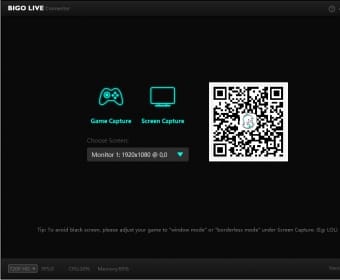
Head to the BIGO LIVE online PC page, hit Connector, and grab that 40.5 MB file (installs to 20 MB). Done in under a minute.
Step-by-step, no fluff:
- Open BIGO LIVE online PC.
- Find Connector.
- Download and install (<1 min).
- Double-check the 40.5 MB size.
Need Bigo diamonds to fuel those viewer gifts? Recharge Bigo diamonds has low prices, instant top-ups, secure payments (credit cards, Binance Pay, USDT), 24/7 support, and killer user ratings. I've tested 'em—reliable as hell.
Installing Bigo Connector on Your PC
Snag it from BIGO LIVE online PC's Connector section, launch the installer, breeze through the wizard (<2 min), then run as admin.
Nailed it in detail:
- Run the installer.
- Finish setup.
- Launch, log in with your mobile credentials, pick Tag/Camera.
- Jump into Live Mode.
Test it with admin privileges to ensure capture works. Black screen? We'll fix that later.
Linking Bigo Connector to Your Bigo Live Account
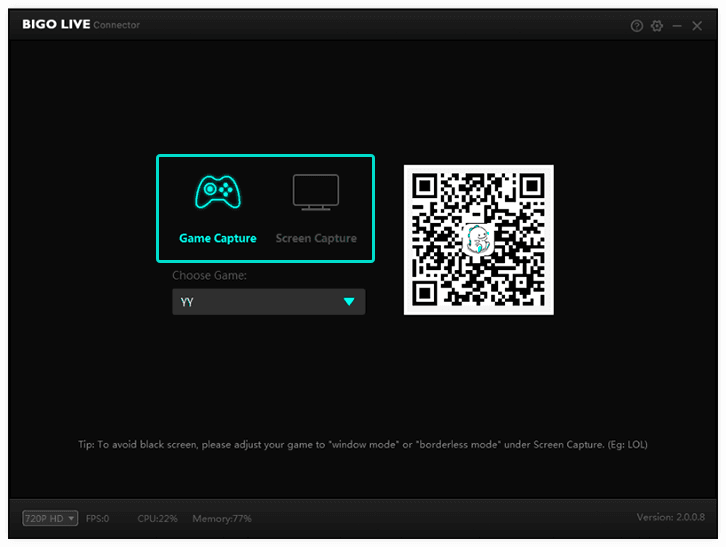
Fire up Connector, generate a QR code, and scan it with your mobile app. Boom—instant link.
Linking without headaches:
- Launch Connector.
- Hit generate QR.
- Scan via mobile app.
- Stuck? Update the app, match accounts, restart.
It syncs across multi-devices in 150+ countries. Seamless.
Setting Up Your First Gaming Stream with Bigo Connector
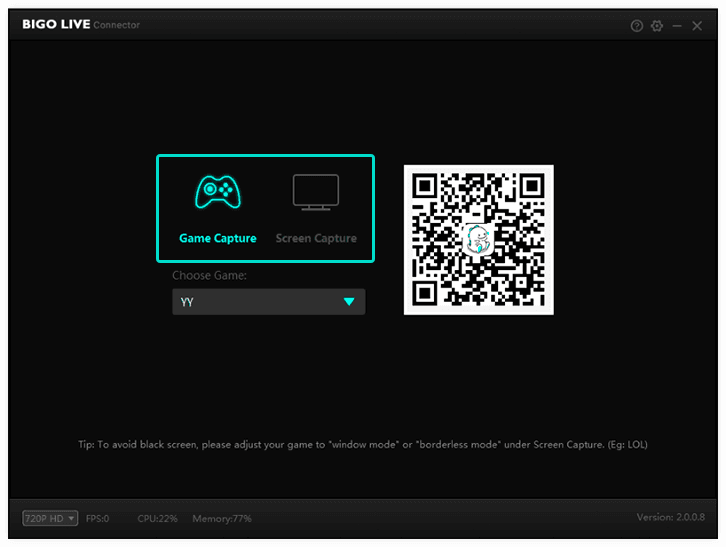
Game Capture for open apps or Screen Capture for the full desk—your call. Head to Tag/Camera > LIVE > PC, scan QR. Launch PUBG in windowed mode, watch FPS/CPU ticks.
Your full first-run playbook:
- Open your game (say, Dota 2) in window or borderless.
- In Connector, pick Game Capture and dropdown-select it.
- Tag/Camera > LIVE > PC.
- Scan QR; dive into comments, beans.
Audio sets itself. Hide the toolbar for immersion.
Stocking up on viewer gifts? Hit the Bigo Live store through Buffget: fastest delivery, crypto options (ETH/USDC), full compliance, 24/7 support. (Editor's take: Crypto top-ups? Game-changer for global grinders.)
Optimizing Bigo Connector for High-Performance Gaming
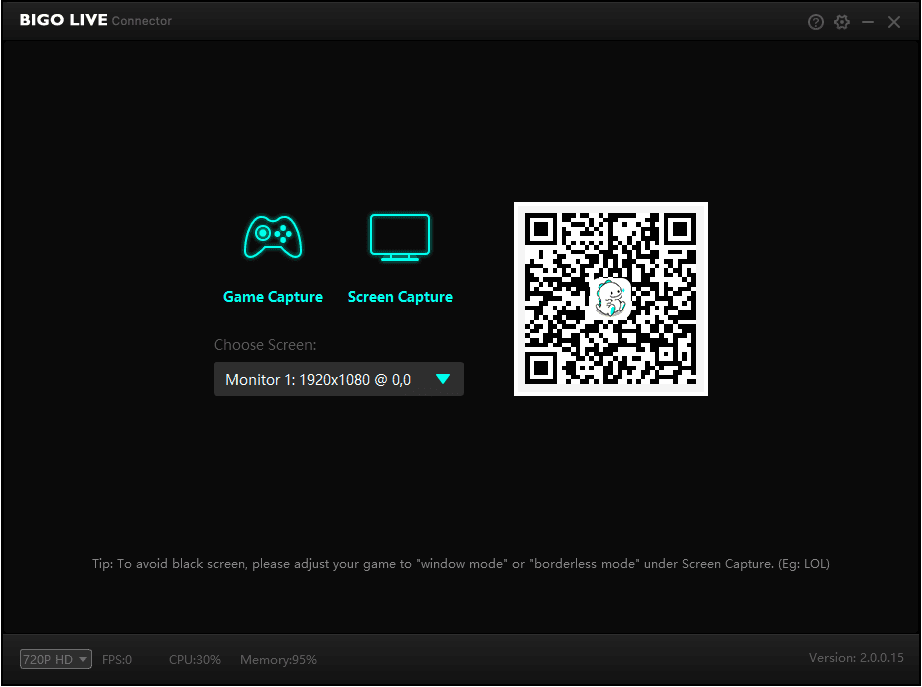
Glance at the bottom bar: video quality, FPS, CPU usage. Game Capture sips less CPU than Screen. Borderless windows? Gold.
Tune for peak performance:
- Prioritize Game Capture.
- Tweak if CPU spikes over 80%.
- Hide that toolbar.
- Fortnite pros: Aim for 60+ FPS windowed.
Latency? Crushes mobile mirroring every time.
Common Bigo Connector Issues and Fixes for PC Users
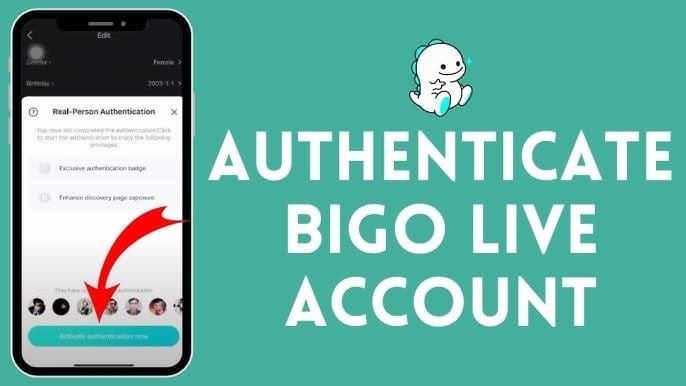
Quick fixes that save streams:
- Black screen: Switch to borderless, Game Capture, admin restart.
- QR failure: Accounts match? App updated?
- Lag: Eyeball CPU/FPS, test your net.
- No capture: Admin rights, verify test programs.
Holds a steady 4.1/5 rating. These snag most folks—I've seen it.
Bigo Connector vs Alternatives: PC vs Mobile Streaming
PC rules with direct capture—no emulator hacks or mobile bottlenecks. Get FPS metrics, PK battles, multi-guest action. Beats mobile on fullscreen GTA high-FPS (research shows it). Native low-latency over mirroring. Trade-off: Still needs mobile QR. 600M+ audience awaits.
FAQ
What is Bigo Connector for Bigo Live?
PC tool (v2.0.0.39) for games/screens to BIGO LIVE; Game/Screen Capture, viewer interaction.
How do I download Bigo Connector for PC?
BIGO LIVE online PC > Connector > 40.5 MB download; install as admin.
Can I use Bigo Connector for gaming streams on PC?
Yes; PUBG/Fortnite/Dota 2 via Game Capture; monitor FPS/CPU.
What are the system requirements for Bigo Connector?
Windows, 20 MB storage, admin, mobile app, broadband.
How to fix Bigo Connector not connecting on PC?
Admin run, QR scan updated app same account; restart.
Is Bigo Connector better than mobile for Bigo Live gaming?
Yes; direct capture, high-FPS, no battery issues, 600M+ reach.